



What is VAT in Dynamics 365 – and why does it matter?
For many CFOs and finance professionals in mid-sized companies, VAT handling in the ERP system may seem like a standard function – something that just needs to work. However, with increasing regulatory requirements, more complex supply chains, and businesses operating across borders, it’s important to understand how VAT in Dynamics 365 actually works – and when it requires attention.
In this article, we provide a basic introduction to VAT setup in Dynamics 365 and explain why it can have significant benefits and implications for daily operations and compliance.
From tax groups to engine – what’s what?
VAT in Dynamics 365 is not just a value in a field on an invoice. It is a combination of multiple layers of configuration that together ensure correct VAT calculation and reporting in accordance with local legislation.
At the core of the setup are tax codes, sales tax groups, and item sales tax groups. In short:
- Tax codes define the specific VAT rate
- Sales tax groups are assigned to customers and vendors
- Item sales tax groups are assigned to products and services
These are configured in Dynamics 365 to match national and international VAT rules. The system then uses a built-in tax engine to ensure VAT is calculated correctly when, for example, a sales invoice is created, or a purchase is posted.
As one of AlfaPeople’s experts explains:
“There is an engine within Dynamics 365 that, based on tax codes and country-specific rules, calculates VAT correctly in both sales and purchasing processes.” – Benita Christensen
It’s not just “tax” – sales vs. purchase VAT
A common misconception is that VAT and tax are the same. They are not. While “tax” often refers to a company’s own tax obligations, VAT is collected and reported on behalf of the state, and must follow the goods and transactions throughout the process.
There is also a distinction between:
- Output VAT, which you charge your customers
- Input VAT, which you pay to suppliers and can deduct in your VAT settlement
In practice, things become more complex when goods move across borders. For example, if a Danish company ships goods from a warehouse in Germany to customers in the Netherlands, EU VAT may need to be applied instead of Danish VAT – and this is where the system must handle the complexity.
Advance Tax Calculation – the new tool in the toolbox
In recent years, Microsoft has introduced and enhanced a feature called Advance Tax Calculation in Dynamics 365. This module enables companies to:
- Manage VAT registrations in multiple countries
- Configure advanced calculation matrices
- Automate EU sales lists and VAT declarations
- Eliminate manual and error-prone processes
According to Claus Andersen, this addresses a growing challenge:
“There are increasing requirements from authorities for electronic reporting. This requires the right system setup – and Advance Tax Calculation is a great support in that regard.” However, be aware: it requires proper configuration and a clear understanding of your company’s structure, products, and vendor relationships. Not all versions of Dynamics 365 support this feature – older AX or Business Central installations may have limitations.
When should you review your VAT setup?
Is it necessary to revisit your VAT setup in Dynamics 365? The answer is yes – if your business falls into one or more of these scenarios:
- You are VAT-registered in multiple countries
- You operate production or warehouse locations across borders
- You have customers or vendors with multiple VAT numbers
- You still submit EU sales lists or VAT reports manually
- You have experienced VAT calculation errors and need to issue credit notes
As Benita Christensen points out: “VAT follows the goods – and if your system is not set up correctly, you risk incorrect VAT on your invoices, penalties, or heavy manual work every month.”
It’s about more than compliance
Beyond ensuring legal compliance and accurate reporting, a well-configured VAT setup in Dynamics 365 can:
- Save time and resources in the finance department
- Reduce errors and manual tasks
- Improve data quality and decision-making
- Prepare the business for growth and international expansion
In short: VAT setup is not just a compliance issue – it’s a key part of financial efficiency.
From theory to practice – three scenarios you may recognize
If you’re unsure whether your business needs a more advanced VAT setup in Dynamics 365, consider these examples. They illustrate typical situations that require proper VAT configuration and often Advance Tax Calculation:
Example 1
A Danish company purchases goods in Germany and ships them directly to a customer in Sweden. This type of EU triangulation requires specific reporting and correct VAT treatment in accordance with EU regulations.
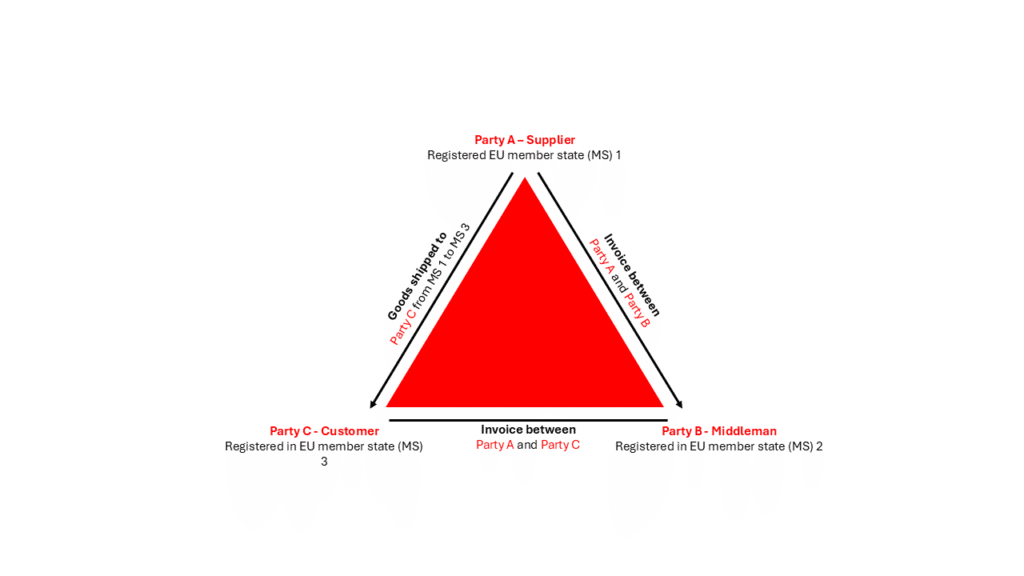
Source: Simplified EU Compliance with VAT Triangulation Puzzle
Example 2
A company selling across multiple EU countries delivers goods from a central warehouse. VAT must be handled differently depending on the destination and applicable local rules in countries such as France, Italy, or Poland.
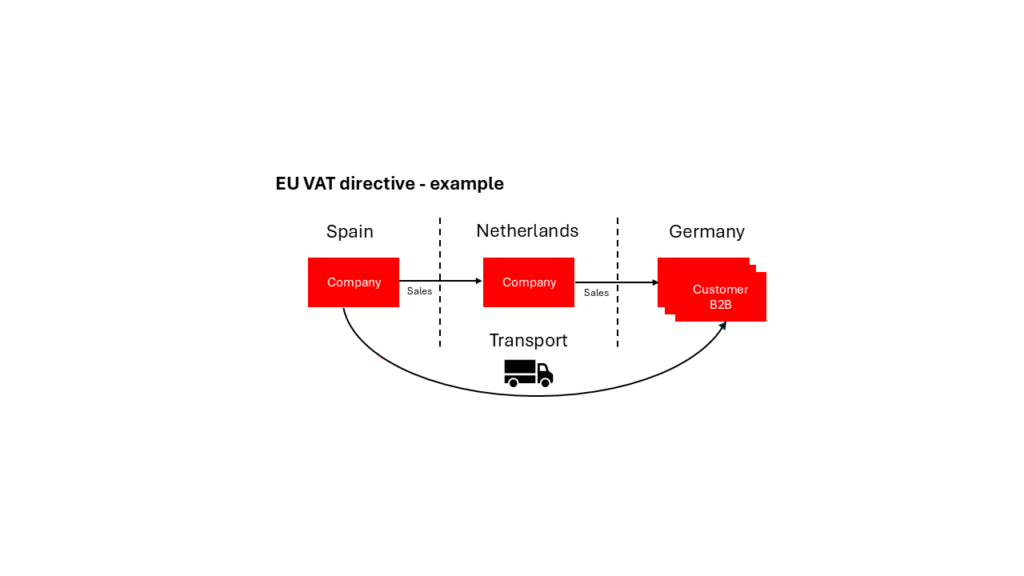
Source: VAT treatment – Cross Border Transactions inside the European Union – Integra International
Example 3
The company stores goods in another EU country to enable faster delivery (cross-border fulfillment). This may trigger VAT obligations in the country of storage – even if the sale is made from Denmark.
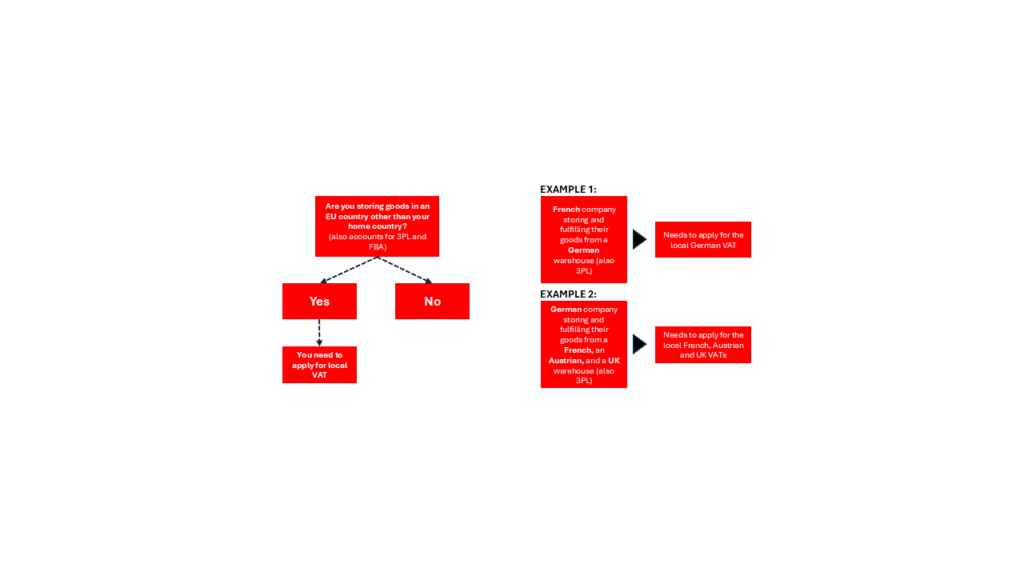
Source: VAT Implications with cross-border fulfillment in Europe | byrd
As these examples show, your ERP solution must not only support the transaction itself but also ensure that the entire process can be reported correctly. This requires a system capable of handling the complexity of modern logistics and VAT.
Ready to review your setup?
Do you need to assess whether you are fully leveraging the VAT capabilities in Dynamics 365? Are you unsure how Advance Tax Calculation could support your business?
Contact us for an informal discussion – we’re happy to review your VAT setup and provide guidance based on your business needs.


